




How to Print from Lightroom

A person editing in Lightroom

Lightroom is an incredible photo editing software with fantastic features that makes editing real estate photos straightforward for professionals and beginners. However, it can be frustrating if you don’t know how to print from Lightroom, as you can only keep your photos in a digital format or post them online. How to Print From Lightroom … Read more

How Much Is Lightroom?

Editing images on Lightroom

Lightroom is a comprehensive photo editing and image management software. It allows photographers to complete their photography workflow such as importing, processing, and exporting images. But how much is Lightroom? Is it worth the price? Although Lightroom has been in the market for many years, still many users get confused about this. How Much Is … Read more

How to Edit in Lightroom Like a Pro

Tone curve for adjusting overall contrast and brightness in Lightroom

Lightroom has proved to be a total game-changer in the world of image editing. It has become one of the leading post-processing programs used by many professionals. By learning how to edit in Lightroom like a pro, you can take your images to a whole new level in a matter of minutes.

How to Sell Lightroom Presets

Applying the newly created Lightroom preset

Lightroom is currently one of the most powerful image editing programs. It allows you to transform images by providing a wide collection of tools. You can also use Lightroom to make some extra money if you know how to sell Lightroom presets. Read this guide to know all about Lightroom presets so that you can avail its full benefits.

How to Sync Lightroom Presets to Mobile

Syncing Lightroom Presets to mobile through the drag and drop method

Lightroom mobile and Lightroom presets are a quick and convenient solution to your post-processing needs. Using them together, you can easily transform your images within minutes. In order to keep presets updated on your Lightroom mobile app, you should know how to sync Lightroom presets to mobile.

How to Export All Photos From Lightroom

Lightroom Export option from pop-up menu

Once you have completed editing all the photos in your collection, you will naturally want to save them for later use. In Lightroom, you have to export the images in order to save or share them. We will be showing you how to export all photos from Lightroom in a few simple steps.

How to Create a New Catalog in Lightroom

Lightroom Catalog settings

One of the best features of Lightroom is its catalog system that helps you manage all your images at a single location. Learning how to create a new catalog in Lightroom will help you have an organized workspace to edit and store your images. Let’s look at how the Lightroom catalog helps you in your image editing workflow.

How to Use Lightroom 5

Editing sliders in Lightroom 5

The Lightroom 5 version of the Lightroom program is created specifically for professional photographers and editors. It provides a large variety of tools and features that focus on changing the color, texture, and appearance of images. We will provide you an insight into how to use Lightroom 5 to achieve your image editing goals in the best way possible.

How to See Original in Lightroom

Split Screen mode for viewing original and edited photos in Lightroom

Frequently reverting to the original image is an integral part of photo editing. You need to see how your edits are bringing changes in a photo and whether all the effects are well worth it. Knowing how to see the original in Lightroom will allow you to contemplate your editing in a better way.

How to Make Photos Pop in Lightroom

Adjusting White Balance using Lightroom

Thanks to technological advancement and photo editors like Lightroom, image processing opens unlimited opportunities for us. We can edit our photos the way we like and transform them from an ordinary image to something worth watching. We will walk you through how to make photos pop in Lightroom to heighten their visual appeal.

How to Add Snow in Lightroom

Image with snow added using Lightroom

As a photographer, adding effects to your photos during post-production is so much fun. In Lightroom Classic CC, you can create effects like sunshine, rain, snow, or other weather effects no matter in which season the photo was captured. Learn how to add snow in Lightroom to set a dreamy winter mood in your images.

How to Flip a Photo in Lightroom

Living room with shelf partition

There are times when you want to unleash your creativity as a photographer and create flipped photos for an eye-catching effect. Flipping real estate photos is a great way to transform the orientation of a photo which builds the buyer’s interest. If you want to know how to flip photos in Lightroom, read on to learn the process.

How to Search In Lightroom

Metadata filter in Lightroom

When searching for a specific photo in Lightroom, it may spin your head scrolling through a large number of photos in your catalog. If you know how to search in Lightroom, you can quickly look up that particular photo. All it takes is some efficient organization and know-how to use the Lightroom’s Filter bar.

How to Resize in Lightroom

Select photos to be exported in Lightroom

Image size and dimension is a vital aspect in photography. Specific uses like print, web, and social media posting require specific sizes that give rise to the need to resize your images accordingly. Understanding how to resize in Lightroom will give you total control over your image and file sizes.

How to Reset Lightroom

Resetting Lightroom preferences using keyboard shortcut

Like any other software, facing bugs and errors is not uncommon in Lightroom. We can often get stuck between processing, or the software may come up with errors that need to be resolved. Let’s take a look at how to reset Lightroom for troubleshooting so that you can make the software operational once again.

How to Flag Photos in Lightroom

Compare view of two images in Lightroom

Lightroom is undoubtedly an incredible software to organize your photos. Through its flagging feature, you can pick your favorite photos among the lot and rate or label them to narrow down your selection even more. Learning how to flag photos in Lightroom will ease the process of sorting through hundreds of photos quickly.

How to Stack Images in Lightroom

Number of photos in the stack

Did you know Lightroom Classic has a useful feature of stacking photos in the Grid or Filmstrip view? This feature allows real estate photographers to group several similar images in a single thumbnail. Understanding how to stack images in Lightroom will allow you to organize your catalog in a clutter-free way.

How to Make Lightroom Faster

Disabling Face Recognition and GPS Information to make Lightroom faster

Lightroom Classic CC is undoubtedly an exceptional software for photo processing and organizing. However, it isn’t unusual to face some speed and performance issues while using it. Learning how to make Lightroom faster can help you make the most of your editing time and this amazing software.

How to Save Photos From Lightroom

Saving photos from Lightroom using the Export option

Many Lightroom users find the software’s specific methods confusing as they are against the generic ones that they are used to. Lightroom does it a bit differently when it comes to saving photos due to its non-destructive design. Understanding how to save photos from Lightroom will make it convenient for you to use them outside the software.

How to Convert Raw to JPEG in Lightroom

Exporting image in JPEG Format in Lightroom

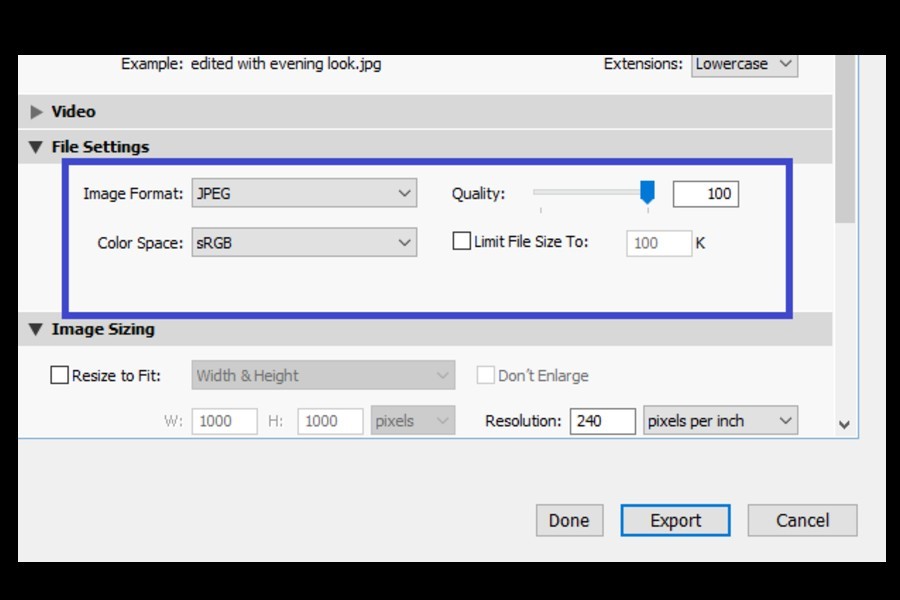
It is a common practice to shoot and edit images in the RAW format. However, when you need to share these images with clients or post them on a blog, you need to convert them into JPEG. Learning how to convert RAW to JPEG in Lightroom will be helpful to use your images externally.

How to Import Photos Into Lightroom

Clicking Import option in Lightroom after selecting desired options

If you want to organize or edit your photos in Lightroom Classic CC, you first need to import them. The process to import photos, although easy, is highly comprehensive, where you get multiple options to handle your images efficiently. Let us walk through how to import photos into Lightroom so that you can organize and process them easily.

How to Update Lightroom

Upgrading Lightroom catalog to the new format

Every once in a while, Adobe rolls out an updated version of Lightroom Classic CC. As a photographer, it’s a good practice to keep updating the software as it has better features and bug fixes for optimized performance. Today we are going to explain how to update Lightroom so that you can safely move on to the new version.

How to Apply a Preset to Multiple Photos in Lightroom

Selecting multiple images in filmstrip view before applying presets in Lightroom

Did you know that in Lightroom, you can apply similar editing effects to many photos within minutes? This is what a quick and efficient editing procedure is all about. You just need to learn how to apply a preset to multiple photos in Lightroom to give them a uniform look in a few clicks.

How to Delete Photos From Lightroom

Remove Photo option in Lightroom

Along with efficient editing, organizing your photos is a prime functionality of Lightroom. Hence, as a regular user of the photo editing software, deleting photos every once in a while is a vital part of your workflow. If you frequently capture tons of photographs, learning how to delete photos from Lightroom will definitely be helpful for you.

How to Duplicate a Photo In Lightroom

Differentiating a duplicated photo with the original in Lightroom

Did you know that you can make copies of an image and edit them in Lightroom? You can also export them as separate images, which lets you create multiple versions of the same photo with different effects. By learning how to duplicate a photo in Lightroom, you can take advantage of the software’s non-destructive editing process.