






Congratulations Alex Vincent, March 2024 PFRE Photographer of the Month! The theme this month was "Kitchen". Alex Vincent - #906 Yvonne Raaijmakers - #909 Peter Wingfield - #902 Here's what Alex has to say: Thank you for the award of Photographer of th ...

As an Amazon Associate we earn from qualifying purchases.
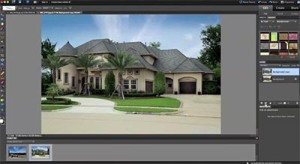 Kimi in Minneapolis has the following questions about sky replacement, adding fire in the fireplace and putting images on TVs:
The Minneapolis
photography market is getting a bit more competitive these days, and one thing that a localphotography company is doing as part of their package is replacing grey skies with blue, adding flames to the fireplaces, and overlaying different images on televisions. Although they are one of the most expensive companies in the Twin Cities, the agents are willing to pay that extra dollar for those modified images as I mentioned above. Do you know if this is a norm for other photographers to automatically include this service? Is there an easy way to change the sky without the trees looking like they straight out of a scary movie?? And where are they getting the television images that are not infringing any copyright laws? Any advice on this topic would be greatly appreciated as I would like to be more competitive with this company but I do not want to have my profit eaten up by extra time spent processing these photos, nor do I want any lawsuits!
Here are my answers to Kimi's questions:
By the way, I have a public domain sky and fire library here on the PFRE blog;
Links to these libraries are on the right hand sidebar under Other Links.













The question "Should You Do It For "Free" or Charge Extra?" depends on how you want to market your services and fee's.
You could include it within your service fee and Call it free, but really, your service fee should take that enhancement into consideration. On the other hand you could have a lower service fee, with "options" that give the agent choices on how much they want to invest in their clients.
Awhile back, I was asked by an agent why I did not include a service in my coverage and that one of my competitors did and while they liked my finished product better, they did not like the idea of paying extra for the add-on service. Since I know my competition and what they charge, I was able to point out to him that while they included the add-on service, they also charged more for the entire service weather the agent needed it, used it or not. That while my fee for the coverage and add-on (effectively the same service) was slightly more, the agent had the option to opt in or out and not pay for services he did not need. This strategy has worked very well for me...
I'm trying to get in the habit of saying 'included' rather than free. Most of the agents around W WA that I talk to assume they get blue sky during the rainy months... So I market it as $20 each but included during a limited time - the fact is I've never charged for it.
It's funny how some agents think TV inserts look tacky and others insist on it. Personally I think they're downright embarrassing, but the client is King. Blue sky is a 3 minute job if you have coffee or take a phone call while you're doing it. Here's my favorite tutorial: http://www.photoshopessentials.com/photo-editing/replace-sky/
I will replace a sky at my discretion with no additional charge if I have the time and I feel that the image needs it. If it is specifically requested by the customer, I will charge a $10 fee. If I start getting a bunch of competition, I will take the time to do more as a standard service. Just as Larry writes, it not hard to do and with practice, it can be done quickly. I always shoot brackets of the front exterior to make selecting the sky easier; I select the best exposure for the home and usually the brightest exposure to create the mask. Since I work from a tripod or take the photos in high speed drive, alignment is easy for PS to do automatically.
My terms state that I will do a sky replacement on the main exterior image at no charge. Any additional image, there is a fee. Otherwise, you could end up doing a lot of very complex Photoshopping.
It's a tough issue, especially here in Seattle where it can be rainy quite a bit. It's hard to convince the client that putting a bright blue sky into a rainy image doesn't just miraculously make it look like a summer day.
I do all sky replacements as part of my normal service as I want my images to look their best.
I substitute skies on front photos at no charge. I figure that the extra couple of minutes are worth it to improve the 'money shot'. It also radically reduces the number of postponements due to weather when the agent knows that I can produce good exteriors on those dark days. It also virtually eliminates return trips to shoot new exteriors. Pool or lake properties are totally different though. I'll delay exteriors until a sunny day for those. I've never been able to successfully fix the grey sky reflections on the water. I'll add fire to fireplaces during our 6 month Minnesota winters, but not during the rest of the year. I'll add images to the television screens if they are the focal point of the images. Otherwise I don't bother if I think that they distract from the rest of the room.
Here in Melbourne Australia the market is very, very competitive. 99 percent of agents simply expect sky replacement. It is a given. Therefore, I set my prices accordingly. There are many different techniques for replacing the sky. Some are quick and dirty and look terrible. They are particularly favoured by the "Churn & Burn" companies. There are a few techniques that look great but they take more time and a much more meticulous approach. I guess it comes down to how you want your work to be perceived in the market place and how proud you are of it. I suggest finding a sky replacement technique you are happy with and practice, practice, practice until you can do it quickly and effectively.
I have never charged extra to do a sky replacement as it doesn't take that long to do one although I don't let my client know that. Once I learned how to do it I use it quite often now. I use a very simple program from On1 software called Perfect Mask 5.
PM5 is not the latest version but I'm used to it and it works fine for me.
1/ I hate TV screens filled with image they distract from the room and take the eye away from the selling product, the house. Movie Rooms need a screen filled to give context
2/I can replace a sky in seconds I do them automatically/no charge for my clients, I do a blend of cloud/blue sky you only need a kiss of blue in the picture a full blue sky on overcaste day the light does not match so use a mix of cloud and blue and blend it down with the gradient tool,
3/over done sky's take away again from the main product the house, sky replacements should be subtle, over done sky's make images look fake especially over cooked sunset sky's
I prefer to "enhance" the sky, rather than replace. I find that with the tools I use; LightZone, and PSP with my favorite Topaz Labs plugin -- Adjust, I can make the grayest sky look better with well-defined clouds and blue poking through. This, IMHO, results in a more natural result -- less "fake".
Here's some examples -- before and after --- sky "enhancement" rather than "replace".
https://www.flickr.com/photos/allenteam/albums/72157660614957677
@Michael Allen - Your example illustrates that this technique works OK sometimes but should be done selectively to just the sky rather than the whole image. Here is a post on the technique you probably use Scott's Quick And Easy Sky Replacement Technique
that shows how to do it selectively to just the sky.
To me, your example #3 is a disaster because you've pumped up the saturation on the moss on the roof of the home to accentuate that fact the home has a bad moss problem and the surrounding trees are way over the edge.
Doing a sky replacement is NOT difficult and with a little practice gives better results.
I include sky replacement in my photo packages. Granted the sky is usually always overcast in Western Washington. However, if the agent asks for more than I provide I will charge in regards to what they are requesting. I try to go over the expectations of the agent so that they are WOWED and are more willing to use me again in the future.
When it comes to TVs I prefer the Mike Kelly method of adding a black and white gradient and then lowering the opacity to bring back some of the original reflections.
@Larry
Thanks for the comments...
>> "...pumped up the saturation on the moss on the roof of the home"
Yes, I agree. That's not the photo I ended up sending to client. I specifically pumped it up for the illustration of the concept. I used a Hue & Saturation adjustment layer mask and then a adjustment brush to select which parts of the adjustment to keep and also stepped down the opacity a bit. I was overly enamored by the "golden roof" so I left it in this time.... Normally I would only select the sky.